
PWA#
The OpenSync Synchronizer PWA groups the internal rate timer and trigger/gate controls under System, with settings for outputs CH A through CH H below.
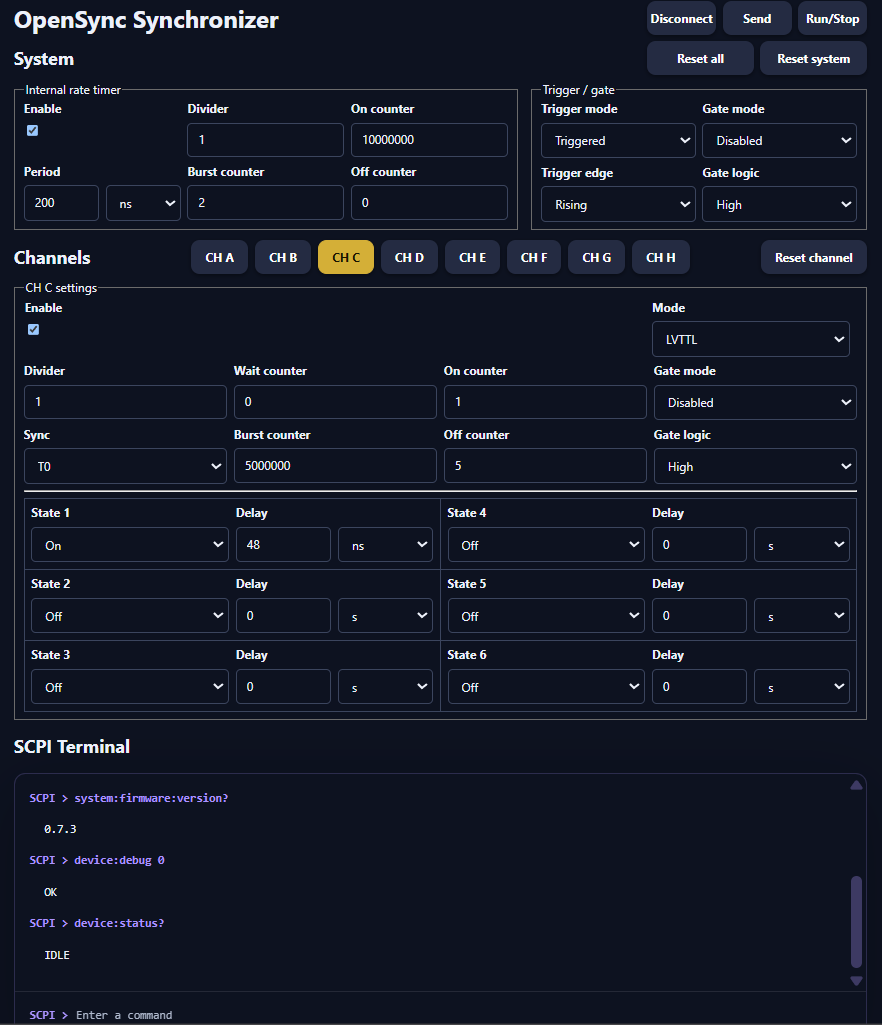
OpenSync Synchronizer PWA: system settings, output-channel controls, and the SCPI terminal.#
Use the controls#
Connect / Disconnect opens or closes the USB serial connection. Select filtered port in the browser’s serial-port selector when prompted.
System sets the internal rate timer, its counters, and trigger/gate modes.
CH A–CH H selects the output channel whose settings you are editing.
Send uploads the system and channel settings to the device.
Run/Stop queries device status and requests a start or stop.
Reset all, Reset system, and Reset channel restore the respective settings in the editor. Use Send to apply edited settings to the device.
SCPI Terminal sends individual commands and displays responses.
Settings are stored locally in the browser through DBOPFS. Editing or saving browser settings is separate from sending them to the device. Close the serial connection before switching control between the PWA and a Python session. Closing the app also automatically closes the serial port in most cases through resource management.
For installation steps, see Install the PWA.