
Pulse Timing and Plotting#
Overview#
This document describes the procedures and methods for pulse timing and plotting typical of a Particle Image Velocimetry (PIV) experiment. PIV is an optical method of flow visualization used to obtain instantaneous velocity measurements and related properties in fluid flows. Accurate timing of pulsed illumination sources and imagining devices (e.g., cameras) is key for this measurement technique to work as intended. A timing device ensures that all comonents of a PIV experiment are operating at the intended frequency. The pulse pattern of a timing device directly contributes the performance of a PIV system. This is why it is important to understand how to create pulse patterns and create a visualization of them for further data-informed decisions.
Purpose#
This example creates a simple pulse sequence and plots it for visualization purposes. In a typical experiement, the pulse parameters will be loaded into an OpenSync device once they are deemed sufficient for the purpose of the experiment being performed. However, the loading and executing of pulse sequences will not be discussed in this document.
Creating the Pulse Paramters#
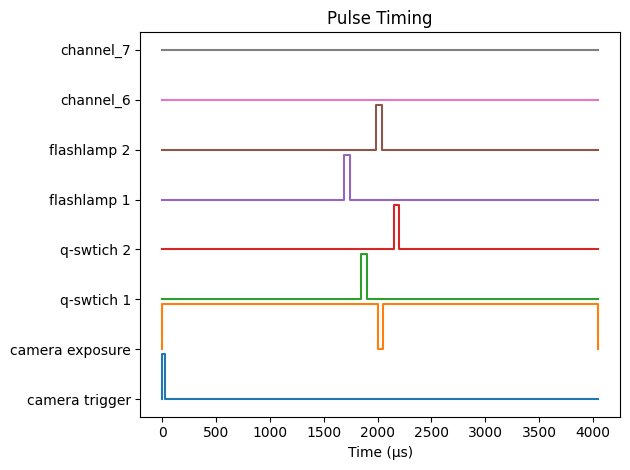
There are several ways of creating pulse parameters of which the most simple one will be discussed below. The pulse sequence we are trying to model is a single camera and a dual-head flashlamp-pumped laser. A dual-head flashlamp-pumped laser consists of four inputs: flashlamp 1, flashlamp 2, q-switch 1, and q-switch 2. The flashlamps in this case need to be turned on 160 microseconds before the active q-switch and each pulse needs to be 50 microseconds wide. For the purposes of this demonstration, the itnerframe tiem between laser pulses will be 300 microseconds. The camera will be externally triggered so that the exposure is synchronized with the laser pulses. The exposure of the camera is internally set to 2,000 microseconds, so we do not have to worry about externally controlling the exposure. Finally, the external trigger for the camera must be 25 microseconds long.
Imports#
To begin, we need to import some functions from the package opensync and matplotlib
[1]:
from matplotlib import pyplot as plt
import opensync
Create the Pulse Parameters Structure#
All pulse paramters in this instance are held using a dictionary structure. The dictionary structure contains information for external triggers, repetition rate, and the state of each channel.
[2]:
pulse_params = opensync.get_pulse_params()
pulse_params
[2]:
{'channel_0': {'name': 'channel_0',
  'state': False,
  'divider': 1,
  'data': [],
  'wcounter': 0,
  'bcounter': 0,
  'pcounter': 1,
  'ocounter': 0,
  'sync': 't0',
  'output_level': 'lvttl'},
 'channel_1': {'name': 'channel_1',
  'state': False,
  'divider': 1,
  'data': [],
  'wcounter': 0,
  'bcounter': 0,
  'pcounter': 1,
  'ocounter': 0,
  'sync': 't0',
  'output_level': 'lvttl'},
 'channel_2': {'name': 'channel_2',
  'state': False,
  'divider': 1,
  'data': [],
  'wcounter': 0,
  'bcounter': 0,
  'pcounter': 1,
  'ocounter': 0,
  'sync': 't0',
  'output_level': 'lvttl'},
 'channel_3': {'name': 'channel_3',
  'state': False,
  'divider': 1,
  'data': [],
  'wcounter': 0,
  'bcounter': 0,
  'pcounter': 1,
  'ocounter': 0,
  'sync': 't0',
  'output_level': 'lvttl'},
 'channel_4': {'name': 'channel_4',
  'state': False,
  'divider': 1,
  'data': [],
  'wcounter': 0,
  'bcounter': 0,
  'pcounter': 1,
  'ocounter': 0,
  'sync': 't0',
  'output_level': 'lvttl'},
 'channel_5': {'name': 'channel_5',
  'state': False,
  'divider': 1,
  'data': [],
  'wcounter': 0,
  'bcounter': 0,
  'pcounter': 1,
  'ocounter': 0,
  'sync': 't0',
  'output_level': 'lvttl'},
 'channel_6': {'name': 'channel_6',
  'state': False,
  'divider': 1,
  'data': [],
  'wcounter': 0,
  'bcounter': 0,
  'pcounter': 1,
  'ocounter': 0,
  'sync': 't0',
  'output_level': 'lvttl'},
 'channel_7': {'name': 'channel_7',
  'state': False,
  'divider': 1,
  'data': [],
  'wcounter': 0,
  'bcounter': 0,
  'pcounter': 1,
  'ocounter': 0,
  'sync': 't0',
  'output_level': 'lvttl'}}
Populate the Pulse Paramters Structure#
With the structure created, we can now populate the necessary channels with the pulse information as needed.
[3]:
exposure = 2000
exposure_blind_time = 50

exposure_1_end = exposure
exposure_2_start = exposure

interframe_time = 300
half_inter_time = interframe_time // 2

flash_delay = 160
ttl_pulse_width = 50

# Camera pulse sequence
pulse_params = opensync.config_pulse_insert(
    pulse_params,
    [
        [0, 25]
    ],
    channel_id=0,
    channel_name='camera trigger',
    units='us'
)

# Camera exposure for visualization purposes
pulse_params = opensync.config_pulse_insert(
    pulse_params,
    [
        [
            0,
            exposure_1_end
        ],
        [
            exposure_2_start + exposure_blind_time,
            exposure_2_start + exposure_blind_time + exposure
        ]
    ],
    channel_id=1,
    channel_name='camera exposure',
    units='us'
)

# q-swtich 1
pulse_params = opensync.config_pulse_insert(
    pulse_params,
    [
        [
            exposure_1_end - half_inter_time,
            exposure_1_end + ttl_pulse_width - half_inter_time,
        ]
    ],
    channel_id=2,
    channel_name='q-swtich 1',
    units='us'
)

# q-switch 2
pulse_params = opensync.config_pulse_insert(
    pulse_params,
    [
        [
            exposure_2_start + half_inter_time,
            exposure_2_start + ttl_pulse_width + half_inter_time
        ]
    ],
    channel_id=3,
    channel_name='q-swtich 2',
    units='us'
)

# flashlamp 1
pulse_params = opensync.config_pulse_insert(
    pulse_params,
    [
        [
            exposure_1_end - flash_delay - half_inter_time,
            exposure_1_end - flash_delay + ttl_pulse_width - half_inter_time
        ]
    ],
    channel_id=4,
    channel_name='flashlamp 1',
    units='us'
)

# flashlamp 2
pulse_params = opensync.config_pulse_insert(
    pulse_params,
    [
        [
            exposure_2_start - flash_delay + half_inter_time,
            exposure_2_start - flash_delay + ttl_pulse_width + half_inter_time
        ]
    ],
    channel_id=5,
    channel_name='flashlamp 2',
    units='us'
)
Plotting the Pulse Parameters#
To visualize the pulse paramters, we can create a plot and observe the results. The plotting utilities in OpenSync do not create matplotlib plotting instances, so we have to do that manually.
[4]:
fig, ax = plt.subplots()
opensync.get_pulse_plot(
    pulse_params,
    ax,
    units='us'
)
fig.tight_layout()
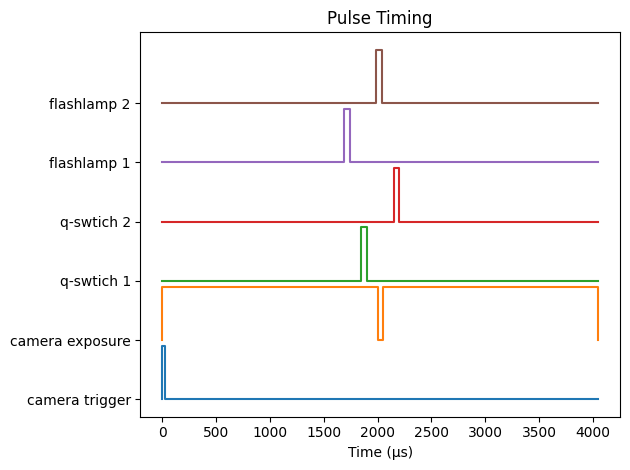
It may also be advantageous to remove any unused output channels from the plot. Setting skip_empty to true in get_pulse_plot will remove any high level output channels that are not being used from the plot to reduce redundant data.
[5]:
fig, ax = plt.subplots()
opensync.get_pulse_plot(
    pulse_params,
    ax,
    skip_empty=True,
    units='us'
)
fig.tight_layout()
Configuring Pulse Operation#
So far, we only touched the basics of adding pulse instruction to the pulse sequencers. As an additional example, we will also program the pulse sequencer counters. The counters select when to perform the pulse sequence. For instance, we may want to wait 1,000 flashlamp cycles to warm up the laser before acquiring images. Additionally, external trigger event may occur at a rate too quickly for a laser to handle. As such, a basic workflow is presented below for a hypothetical experiment where laser warmup is required and images are acquired on every third trigger.
Wait Counter#
The wait counter sets how many clock sequencer events (aka T0) events to ignore. For a laser setup where 1,000 flashlamp pulses are to be sent before measurements, setting wcounter to 1,000 for all channels except for flashlamps will generally accomplish this.
[11]:
# Camera trigger
pulse_params = opensync.config_pulse_wcounter(
    pulse_params,
    count=1000,
    channel_id=0
)
[12]:
# Camera Exposure
pulse_params = opensync.config_pulse_wcounter(
    pulse_params,
    count=1000,
    channel_id=1
)
[13]:
# Q-switch 1
pulse_params = opensync.config_pulse_wcounter(
    pulse_params,
    count=1000,
    channel_id=2
)
[14]:
# Q-switch 2
pulse_params = opensync.config_pulse_wcounter(
    pulse_params,
    count=1000,
    channel_id=3
)
Pulse and Off Counters#
The pulse and off counters select the pattern of which T0 event triggers a pulse sequqnce. As the name describes, the pulse counter is how many consecutive T0 events are pulse events. Likewise, the off counter is the number of consecutive T0 events that do not produce pulse events. Some commercial digital delay/pulse generator have a divide-by-n function where every nth event is skipped. In OpenSync, this is accomplished using the off counter. For our example, we want to skip two
triggers before starting a pulse sequence. This can be accplished by setting the pulse counter to 1 and off counter to 2 for all channels.
[18]:
# Since we use the first six channels consecutively, we can simply loop over them
for i in range(6):
    pulse_params = opensync.config_pulse_pcounter(
        pulse_params,
        count=1,
        channel_id=i
    )

    pulse_params = opensync.config_pulse_ocounter(
        pulse_params,
        count=2,
        channel_id=i
    )
[ ]: